


The Messages step controls the copy shoppers actually read next to the progress bar — the same wording appears on the Cart page, the Checkout page, and inside the Side Cart drawer if that plugin is also active, since all three pull from the same renderer.
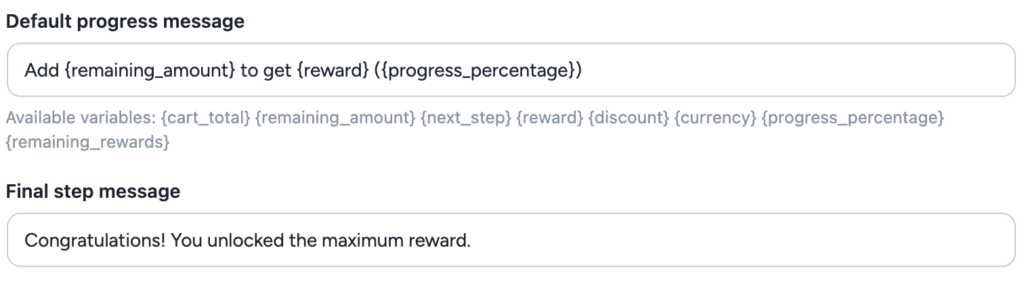
Default progress message
Shown while a shopper is progressing toward the next unlocked step. This is a template rather than fixed text, so it can reference the specific reward and remaining amount for whichever step is next — letting one campaign speak to shoppers at every stage of the ladder without you writing a separate message per step. Left empty, it reads “Add {remaining_amount} to get {reward}”.
Final step message
Shown once a shopper has reached the highest step in the campaign and there is nothing further to unlock. Use this to confirm what they’ve earned, rather than repeating the “how much more to add” framing that only makes sense while a step is still out of reach.
Variables
Type these into the progress message and they are replaced with the shopper’s own numbers:
{remaining_amount}— how much more the shopper needs to add to reach the next step.{reward}— what the next step unlocks, e.g. “10% discount” or “Free shipping”, or the step’s own message if you gave it one.{next_step}— the next step’s minimum cart total.{cart_total}— the cart total that counts toward the steps.{discount}— the discount the shopper already has.{progress_percentage}— how far along the ladder the cart is, e.g. “40%”.{remaining_rewards}— how many rewards are still ahead.{currency}— your store’s currency symbol.
Sale items note
When a campaign’s sale products don’t count, the small note under the progress bar is written in the Display & Rules step (Note under the progress bar, see Display, rules and coupon behaviour). It accepts all the variables above, plus two of its own:
{excluded_amount}— the value of the sale products in the cart, at their sale price.{excluded_count}— how many sale items are in the cart, counting quantities.
For example: “Your {excluded_count} sale item(s) ({excluded_amount}) don’t count — add {remaining_amount} more to get {reward}.” The progress message itself stays as written, and the note disappears once the shopper reaches the top step.
Where this text appears
The same message copy is reused everywhere the ladder is shown — Cart, Checkout, and the Side Cart drawer all render identical wording, styled by the settings covered in Styling the progress bar. There is no separate message field per surface, so a wording change here updates every place the campaign is visible at once.